CSS Tricks Almanac
Selectors and Properties
Selectors and properties, along with values, comprise a CSS rule, which tells a browser how a particular element should look. Selectors define the element to which a set of CSS rules are to be applied. They can include type, class, ID or attibutes among others. Properties are the part of a CSS rule that specifies a particular feature or aspect of an element that is to be styled by the value defined in the rule.
Selectors
Type Selector
The type or element type selector is very familiar as it is one of the first concepts learned in HTML coding. As these tags may be considered to be more generic or broad category, they may not be the best selector to use for applying fine details. However, because they are more generic they are commonly used in CSS Resets, such as normalize.css. Type selectors are considered to be the lowest level in the specificity cascade so those rules may be easily overridden.
Hover Selector
When a :hover pseudoclass is styled, a cursor placed over the element will cause a change or action to occur. This is especially useful for styling links or drop-down menus as it indicates to the user that further options are available, usually by a mouse click.
Properties
Text Decoration Skip Ink
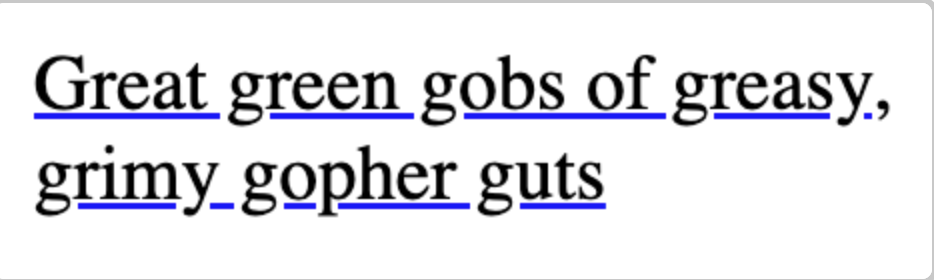
The application of this property would be used in conjunction with text underline. The two values with this property are auto and none. The value of none will cause the underline to go through any characters (e.g. letters) that would fall below the underline. This property with the value of auto would cause the line to skip those characters giving a more elegant look to the text. This is the example that was given:
Widows and Orphans
These are two terms from typography that go together. Widows refer to the last line of a page, paragraph or column that ends up on a new page or column by itself while Orphans refers to the first line being on one page or column with the rest continuing on the next. This usually isn't a big issue on websites where the viewport will accommodate content or scrolling can be utilized but may be useful when columns are part of the layout or when users have an option to print out a piece of information from the site (using @media print in the CSS).
Summary
I found this to be an interesting website as there were many properties I haven't been exposed to. It was also helpful that after providing their explanation, they provide links to other resources on the topic and also provide information on whether various browsers support the property under discussion. It was also interesting to read the attached comments to get the perspective of other developers.